How to Add a Proxy in MyChart

MyChart proxy access allows a trusted person — like a spouse, parent or caregiver — to help manage your healthcare. Whether you're helping an aging parent schedule appointments or a parent monitoring a child's health, adding a proxy in MyChart makes coordinated care easy.
What is a MyChart Proxy?
A proxy is someone who has been granted permission to access another person's MyChart account. Proxies can view medical records, schedule appointments, request prescription refills and send messages to the care team — all on behalf of the patient.
Common proxy relationships include:
- Parents managing a child's health records
- Adult children helping an elderly parent
- Spouses or partners coordinating care together
- Caregivers managing a patient who needs assistance
How to Add a Proxy in MyChart
Watch the video or follow the steps below to learn how to add a proxy in MyChart.
Step 1: Log in to MyChart
Go to mychart.summahealth.org or open the MyChart app.
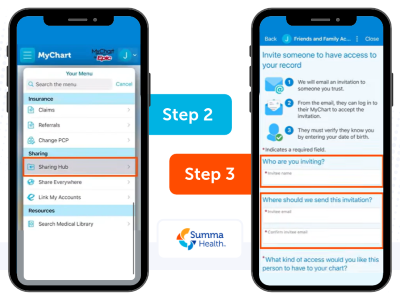
Step 2: Navigate to Proxy Access
- On desktop: Click your name in the top right corner, then select "Share My Record" or navigate to Menu > Sharing > Friends and Family Access.
- On the app: Tap the menu icon and select "Sharing Hub."
Step 3: Invite a Proxy
- Click "Invite Someone" and enter the proxy's name and email address into the required fields.
- Select the level of access you want to grant (full access or limited access).
- Once finished, scroll down and click "Send Invite."
Step 4: Proxy Accepts the Invitation
The person you invited will receive an email with a link to accept proxy access. If they already have a MyChart account, they'll simply log in and confirm. If not, they'll be prompted to create one. Once accepted, the proxy can switch into your account from their own MyChart login.
Proxy Access for Minor Children
If you are a parent or legal guardian, you may be able to request proxy access to your child's MyChart account through Summa Health directly.
Access levels for minors may vary based on the child's age:
- Ages 0–11: Full proxy access is typically granted to parents/guardians.
- Ages 12–17: Proxy access may be limited to protect adolescent privacy in accordance with state privacy laws.
- Ages 18+: All proxy access to the child's MyChart account is terminated. Adult patients can grant access again by submitting a proxy request.
Frequently Asked Questions
Q: Can I have more than one proxy?
A: Yes. You can invite multiple proxies to your account.
Q: Can a proxy make changes to my account?
A: Proxies can perform many tasks on your behalf, but some sensitive changes (like updating your personal contact information) may require direct account access.
Q: How do I remove a proxy?
A: Go to Share My Record > Friends and Family Access, find the proxy you want to remove, and select "Revoke Access."
About the author

Vitality General Wellness eNews Sign Up
Receive the Summa Health eNewsletter for the latest health tips, advice and updates.